What canvas.toBlob() Actually Does to Your Images: Measured in Chrome, Firefox, and WebKit
We measured browser image conversion pixel by pixel: PNG ignores the quality argument, JPEG at quality 100 is still lossy, WebP at exactly 100 flips to true lossless in Chrome and Firefox — and Safari silently returns a PNG when you ask for WebP. That last one was a bug in our own converter.
We ship four image tools — a compressor, a resizer, a PNG to WebP converter, and a JPG to PNG converter — and all four are built on the same five lines of browser code. While writing about that pipeline, we did what we should have done earlier: put it under a microscope. We rendered a test image, ran it through every format and quality setting in three browser engines with Playwright, and compared the output pixel by pixel.
Two results surprised us, and a third turned out to be a bug in our own converter, which we fixed today. All the numbers below are measured, and the harness is small enough to rerun yourself.
The pipeline every browser image tool uses
Strip away the UI and every client-side image converter is this:
const bitmap = await createImageBitmap(file); // decode
const canvas = document.createElement('canvas');
canvas.width = bitmap.width;
canvas.height = bitmap.height;
canvas.getContext('2d').drawImage(bitmap, 0, 0); // raw pixels
canvas.toBlob(callback, 'image/webp', 0.8); // re-encode
The decode step is the important one to internalize: whatever arrives — JPEG, PNG, WebP, an animated PNG, a 16-bit render, a wide-gamut phone screenshot — becomes a plain 8-bit sRGB bitmap on the canvas. Every property that lived in the file rather than in the pixels is gone before encoding even starts. The encoder then writes a brand-new file from nothing but that bitmap.
That model predicts most of what we measured. But not all of it.
One image, five encodings
Our test image is a 1,600×900 canvas: a smooth three-color gradient with deterministic per-pixel noise added, so it behaves like a photograph (incompressible detail everywhere) while staying exactly reproducible. Encoding those identical pixels through toBlob() in headless Chrome 151:
| Encoding | Size | Pixels preserved? |
|---|---|---|
| PNG | 2,900 KB | yes — bit-for-bit (verified) |
| JPEG, quality 0.8 | 208 KB | no (lossy) |
| JPEG, quality 0.92 | 451 KB | no (lossy) |
| WebP, quality 0.8 | 245 KB | no (lossy) |
| WebP, quality 1.0 | 1,455 KB | yes — bit-for-bit (verified) |
One honest caveat: random noise is content JPEG handles unusually well, which is why JPEG 0.8 edges out WebP 0.8 here. On typical photographs Google's WebP study measures lossy WebP 25–34% smaller than JPEG at equivalent quality — if you are choosing a format, our format comparison guide covers that decision. This post is about what happens during the conversion itself.
The last row of that table is the first surprise.
The quality argument is a hint — and each format hears it differently
The HTML spec defines the second toBlob() argument as applying only "if the type is an image format that supports variable quality." In practice, that one sentence plays out three different ways.
PNG ignores it completely. We encoded the same canvas as PNG with no quality argument and with quality 0.1: both produced 2,969,236 bytes — identical output, in all three engines. PNG is lossless; there is no knob to turn. (Our compressor shows a quality slider only for lossy formats for exactly this reason.)
JPEG at 1.0 is still lossy. Quality 1.0 produced a 1,142 KB file — five and a half times larger than quality 0.8 — that still differed from the source: mean per-channel error 0.42, worst pixel off by 4 (on the 0–255 scale). Small, invisible, but not zero, in every engine we tested. JPEG simply has no lossless mode to switch into; quality 100 buys you a much bigger file that is still an approximation.
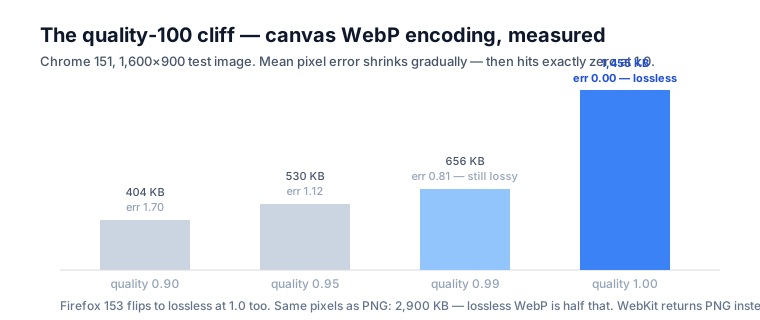
WebP at exactly 1.0 becomes lossless. This was the surprise. Sweeping the quality setting upward in Chrome:
| WebP quality | Size | Mean pixel error | Worst pixel |
|---|---|---|---|
| 0.90 | 404 KB | 1.70 | 13 |
| 0.95 | 530 KB | 1.12 | 10 |
| 0.99 | 656 KB | 0.81 | 6 |
| 1.00 | 1,455 KB | 0.00 | 0 |
That is not a gradual approach to perfection — it is a cliff. At 0.99 the encoder is still lossy; at exactly 1.0, Chrome 151 and Firefox 153 both switch to WebP's true lossless mode, and the decoded output matched our noisy source bit for bit. A lossy codec cannot round-trip per-pixel random noise exactly, so this is conclusive: quality 1.0 means lossless WebP in both engines — at half the size of the PNG holding the same pixels.
We had published the opposite claim on our own converter page ("even at 100, treat the output as lossy") and have corrected it. The nuance that survives: the spec calls quality a hint, no standard mandates this behavior, and 0.99 is not "almost lossless" — it is ordinary lossy. When bit-exact output is a requirement rather than a nice surprise, cwebp -lossless guarantees it; in Chrome and Firefox, the slider at exactly 100 gets you there too.
The Safari trap: ask for WebP, silently receive PNG
The third engine told a different story. In WebKit 26.5 — the engine inside Safari — requesting image/webp at any quality returned a blob of image/png, byte-identical to a plain PNG encode. No error, no rejection: WebKit has no canvas WebP encoder, and as MDN documents the spec's fallback rule, an unsupported type "will be exported as image/png."
Safari is behaving correctly here. The spec even tells authors to check whether the returned format is the one they asked for. We weren't checking. Which means that until today, our PNG to WebP converter in Safari would hand you the original PNG's pixels re-encoded as PNG, name the file .webp, and report "0% smaller" — a mislabeled file and a useless conversion, with no hint anything went wrong.
The fix is two lines, and any canvas-based tool that offers WebP output needs them:
canvas.toBlob((blob) => {
  if (blob.type !== 'image/webp') {
    // Safari fell back to PNG — tell the user instead of
    // shipping PNG bytes with a .webp extension.
  }
}, 'image/webp', 0.8);
Both our converter and compressor now detect the fallback and say so plainly. Note the asymmetry that makes this easy to miss: Safari has displayed WebP since 2020, so the mislabeled file even opens fine in the browser that produced it — it just isn't WebP, and anything downstream that trusts the extension will choke.
Transparency has to go somewhere
JPEG has no alpha channel, so what happens to transparent pixels when the encoder writes one? We drew a red square on a transparent canvas and encoded it both ways, then read the corner pixel back:
- JPEG:
[0, 0, 0, 255]— transparent became opaque black. - WebP:
[0, 0, 0, 0]— transparency preserved exactly.
So a transparent logo converted to JPEG comes back sitting on a solid black rectangle. It is not a glitch; the alpha information has to be discarded, and compositing onto black is what the encoder does with it. If the image has transparency worth keeping, the output must be WebP or PNG.
JPEG → PNG: 8.8× the bytes, zero quality gained
Our JPG to PNG converter exists for pipelines that demand PNG, and its page is blunt about the trade. Now we can quantify it: the 208 KB JPEG from the table above, decoded and re-encoded as PNG, became 1,828 KB — 8.79 times larger — while rendering identically. PNG must store every pixel exactly, and "every pixel" includes every artifact the original JPEG encoding created. Lossless conversion preserves flaws as faithfully as it preserves everything else; nothing can restore detail the source format already discarded.
When does re-encoding compound — and when doesn't it?
"Every save loses more quality" is the standard warning about lossy formats, so we tested it. Re-encoding the same JPEG at quality 0.92, ten times in a row, same dimensions each time: the mean pixel error versus the original was 0.69 after one pass — and still 0.69 after ten. The loss converged instead of compounding. When the pixel grid and quantization stay aligned, a JPEG re-encode approximately reproduces itself.
Then we changed one variable. Shrinking the image by 4% and re-encoding at 0.92, eight rounds in a row — the "download, tweak, save" loop in real life, and what happens if you run an image through a resizer repeatedly — versus a single direct resize to the same final dimensions:
| Path to 1,155×649 | Pixel error vs. single resize | Final file |
|---|---|---|
| One direct resize | — | 174 KB |
| Eight resize + re-encode rounds | mean 3.27, worst 25 | 84 KB |
The multi-pass file is half the size — because it has half the detail. Once resampling misaligns the pixel grid between encodes, each pass genuinely loses new information, and the file shrinks as its content blurs away. The practical rule falls straight out of the numbers: resize once, from the best original you have, and keep that original.
What else dies at the canvas
The decode-to-bitmap step at the top of the pipeline erases every property stored in the file rather than in the pixels. Briefly, since our converter's edge-case list covers them in detail:
- Metadata — EXIF camera data, GPS location, timestamps, copyright, PNG text chunks: the encoder never sees them. Privacy feature or data loss, depending on the day.
- Animation — an animated PNG contributes only its default image; the output is one frozen frame.
- Wide-gamut color — the canvas works in sRGB by default, so Display P3 screenshots get pulled to sRGB; saturated reds and greens dull slightly.
- Bit depth — 16-bit PNG channels are flattened to canvas's 8 bits before encoding.
The bottom line
A browser image converter is a tiny pipeline with sharp edges: everything decodes to a plain 8-bit sRGB bitmap, and the quality argument means three different things depending on the format — ignored by PNG, still-lossy-at-100 for JPEG, and a secret lossless switch at exactly 100 for WebP in Chrome and Firefox. The spec-sanctioned PNG fallback means any tool offering WebP output must check blob.type or it will lie to Safari users — as ours did until these measurements caught it. If you take one habit away: verify what the encoder actually produced, because the API is designed to succeed silently rather than fail loudly.
Frequently asked questions
Why does Safari return a PNG when I request WebP from canvas.toBlob()?
Because the HTML spec says an unsupported type falls back to image/png rather than failing, and WebKit has no canvas WebP encoder. The blob you get back is a perfectly valid PNG with blob.type set to image/png — the spec even advises authors to check the returned type. If your code names the file .webp without checking, users download mislabeled PNGs, which is exactly the bug we found and fixed in our own converter.
Is canvas.toBlob() with quality 1.0 lossless?
For JPEG, no — we measured a small but nonzero mean per-channel error (0.4 to 0.7) in all three engines, because JPEG has no lossless mode. For WebP, Chrome 151 and Firefox 153 both switch to true lossless encoding at exactly 1.0: the output decoded back bit-for-bit identical to the source in our tests. But the spec treats quality as an encoder hint, so treat that as an implementation detail, not a guarantee — at 0.99 you are firmly back in lossy territory.
Why is my PNG so much bigger after converting from JPEG?
PNG is lossless, so it must store every pixel exactly — including the compression artifacts JPEG already baked in. In our measurement a 208 KB JPEG became a 1,828 KB PNG of identical appearance, 8.8 times larger. The conversion is still correct when a pipeline demands PNG; it just cannot make the image better or smaller.
Does converting an image through canvas remove EXIF metadata?
Yes, always. The canvas decodes the file into a raw bitmap of pixels, and toBlob() encodes a brand-new file from those pixels alone — camera model, GPS coordinates, timestamps, color profiles, and PNG text chunks are all gone. That is a privacy feature when publishing photos and a data-loss bug when you rely on embedded attribution.